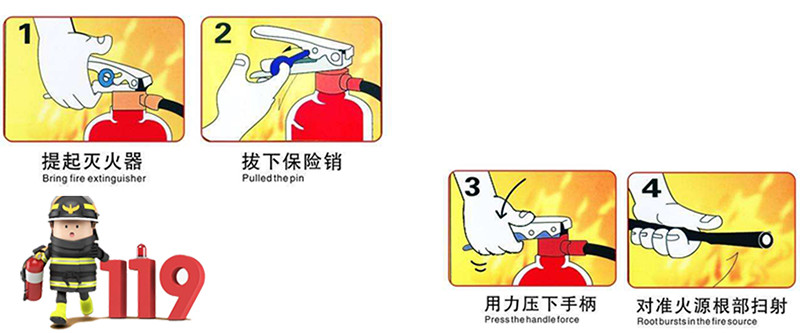
In order to ensure that all employees and relevant responsible personnel can correctly and timely carry out activities such as alarming, evacuation, extinguishing and commanding in the event of a fire, the company will conduct fire drills on 5/27/2022. The fire drill mainly includes the following three parts: Firstly: Evacuation drill Second: How to use fire extinguisher correctly? Thirdly: How to properly perform artificial respiration? 1. Evacuation drill To simulate a fire in an area of the workshop(be careful not to use open flames), an employee finds the fire, and quickly informs the monitor or supervisor by telephone. After hearing the fire emergency evacuation signal, all employees immediately stopped work, cut off the power supply of machinery and equipment, and ran to the regional evacuation exit. Rescue personnel on site organized to greet employees to evacuate in two exits in an orderly manner, and informed employees of the meeting point for emergency evacuation. After the employees fled the scene, they immediately gathered in the open space on the first floor of the company and were not allowed to run without authorization. The on-site supervisor of each area is responsible for immediately counting the number of people (including visitors) and verifying whether there are any omissions, and reporting to the commander-in-chief at the same time Second: How to use fire extinguisher correctly? Thirdly:How to properly perform artificial respiration
Holiday Notice -Dragon BoatFestiva Dear our business partner, Dragon Boat Festival is coming, Our office will be closed from 3th Jun to 5th Jun2022. In case of emergency, If you have any issues and inquiries of JADEVER electronic scales during the holidays, please feel free to contact us by email or whatsapp. What is the origin of the Dragon Boat Festival? Legends about Dragon Boat Festival Qu Yuan was a famous poet during the Warring States period of Zhou Dynasty. He lived in Ancient State of Chu, which is Hu Bei right now. The King of Chu decided to ally with Ancient State of Qin. Qu was banished for opposing this alliance and even accusedof treason.During his exile, Qu Yuan wrote a great deal of poetry, including the famous Li2 Sao1.28 years later after Qu's exile, Qin invaded Chu. With despair, Qu Yuan committed suicide by drowning himself in the Miluo River. Local people raced out in their boats to save him or at least find his body. This is said to be the orgin of Dragon Boat Race. When Qu Yuan's body couldn't be found, people dropped balls of sticky rice into the river, so that fish could heave enough to eat instead of Qu Yuan's body. This is said to be the orgin of rice dumpling. What is the special way to celebrate the Dragon Boat Festival? 1.Dragon-boat races 2.Eating zong zi (glutinous rice (glutinous rice) wrapped to form a pyramid using bamboo or reed leaves) 3.Hang branches of moxa and Wearing a sachet How to get the weight of Zong zi? The weight of Zong zi can be got when you place the Zong zi on JADEVER table top weighing scales.
World Metrology Day: 20 May 2022 World Metrology Day is an event occurring on 20 May celebrating the International System of Units. The date is the anniversary of the signing of the Metre Convention in 1875. Metrology is the study of measurement. The World Metrology Day project is currently realized jointly by the BIPM and the OIML. The theme for World Metrology Day 2022 is Metrology in the Digital Era. JADEVER electronic scale is one of the most important measuring equipment, let us revisit Jadever's original intention on 5.20 International Metrology Day. “ precious quality, priceless friendship” “ More than weighing” “Persistence in quality, Responsible for cost, Challenge against perfection”
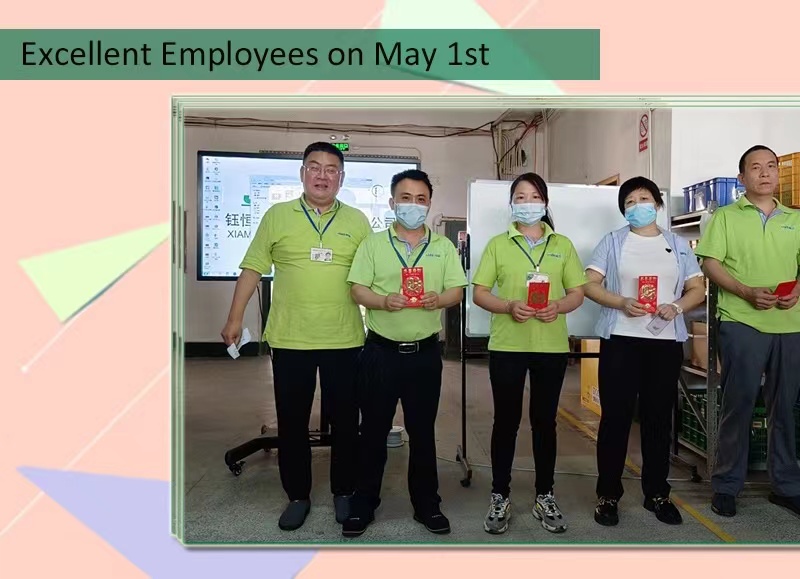
The general manager David rewards the employees who stick to their posts on May 1st, and rewards each outstanding employee with a red bag. 1. Quality Assurance Department: Mrs.Wang 2. Material & Warehouse Department: Mrs.Xie 3. Manufacturing Department: Mrs.Yuan 4. Manufacturing Department: Mr.Liu Let us pay tribute to each of the most beautiful workers, who exude a different light in ordinary positions.
Birthdays are footprints on the road to growth Every birthday witnesses our growth JADEVER held a "birthday party" for employees who have their birthday in May. "Happy Birthday to you, Happy Birthday to you, Happy Birthday to you, Happy Birthday to you....", With the cheerful singing of "Happy Birthday", in the flickering candlelight, the birthday stars make their birthday wishes. The company has prepared beautiful cakes and red bags for the birthday stars, It can enhance the internal cohesion of employees, improve the stability of employees, and give employees more warmth and care after work. Thank you Jadever for caring for the employees, each employee can feel the warmth of home and the happiness of home in the company. In the big family of JADEVER, everyone works together, works hard, respects and loves each other, and strives together for our bright future.
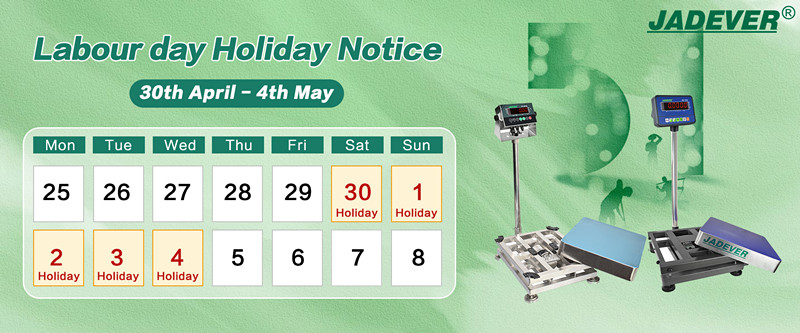
Dear our business partner, Labour Day is coming, Our office will be closed from 30th Apr to 4th May 2022. In case of emergency, If you have any issues and inquiries of JADEVER electronic scales during the holidays, please feel free to contact us by email or whatsapp.
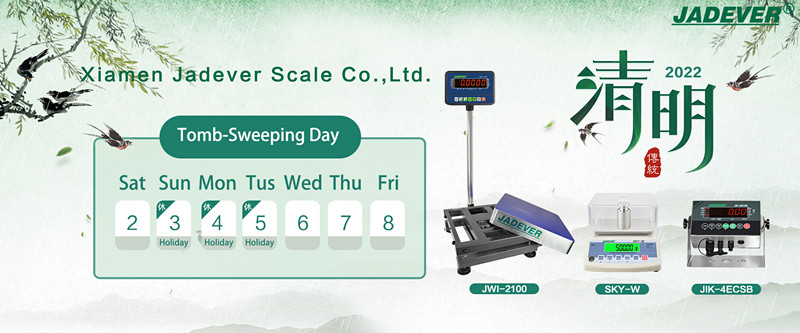
Dear our business partner, Tomb-sweeping Festival is coming, Our office will be closed from 3th to 5th April 2022. In case of emergency, If you have any issues and inquiries of JADEVER electronic scales during the holidays, please feel free to contact us by email or whatsapp.
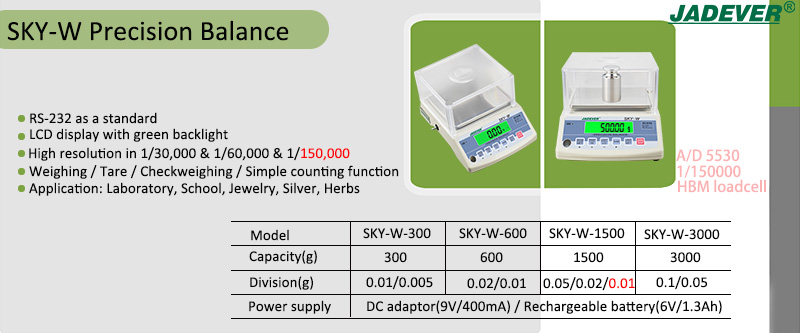
At present, we upgrade the SKY-W precision balance, the resolution can up to 1/60,000 and 1/150,000. Especially for 1/150,000 resolution, it will use HBM load cell and A/D5530. What are the Features of SKY-W precision balance? RS-232 as a standard LCD display with green backlight High resolution in 1/30,000 & 1/60,000 & 1/150,000 Normal weighing / simple counting / Tare / Checkweighing Function Auto printing within OK range Relay/RTC/U-KEY connector/Wifi/Ethernet(Optional) Ideal for applications including laboratory, school,jewelry, gold,silver, herbs,quality control or any other use If want to get more details, pls check below video.







 IPv6 network supported